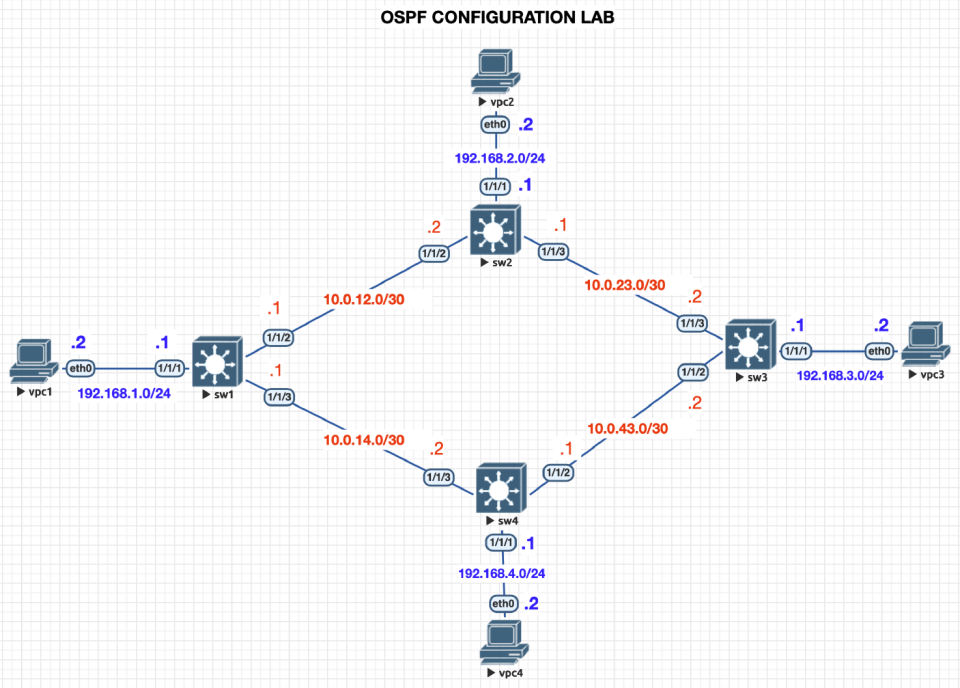
Setup your lab enviroment based on the topology above
Turn on all nodes
If using EVEng (Click “More Actions” on the side and “Start all nodes”
You will need to configure each switch
Hostname
Interface IP
Enable interfsces
Configure OSPF Routing
Test Pinging different PCs
Explorer useful commands
Configure Switches Hostname & Interface IP Addresses
sw1
switch(config)# hostname sw1

sw1(config)# int 1/1/1
sw1(config-if)# ip address 192.168.1.1/24

sw1(config-if)# int 1/1/2
sw1(config-if)# ip address 10.0.12.1/30

sw1(config-if)# int 1/1/3
sw1(config-if)# ip address 10.0.14.1/30

sw1(config-if)# int 1/1/1-1/1/3
sw1(config-if-<1/1/1-1/1/3>)# no shutdown
sw2
switch(config)# hostname sw2

sw2(config)# int 1/1/1
sw2(config-if)# ip address 192.168.2.1/24

sw2(config-if)# int 1/1/2
sw2(config-if)# ip address 10.0.12.2/30

sw2(config-if)# int 1/1/3
sw2(config-if)# ip address 10.0.23.1/30

sw2(config-if)# int 1/1/1-1/1/3
sw2(config-if-<1/1/1-1/1/3>)# no shutdown
sw3
switch(config)# hostname sw3

sw3(config)# int 1/1/1
sw3(config-if)# ip address 192.168.3.1/24

sw3(config-if)# int 1/1/2
sw3(config-if)# ip address 10.0.43.2/30

sw3(config-if)# int 1/1/3
sw3(config-if)# ip address 10.0.23.2/30

sw3(config-if)# int 1/1/1-1/1/3
sw3(config-if-<1/1/1-1/1/3>)# no shutdown
sw4
switch(config)# hostname sw3

sw4(config)# int 1/1/1
sw4(config-if)# ip address 192.168.4.1/24

sw4(config-if)# int 1/1/2
sw4(config-if)# ip address 10.0.43.1/30

sw4(config-if)# int 1/1/3
sw4(config-if)# ip address 10.0.14.2/30

sw4(config-if)# int 1/1/1-1/1/3
sw4(config-if-<1/1/1-1/1/3>)# no shutdown
Configure Virtual PCs Hostname & Interface IP Addresses
vpc1
VPCS> set pcname vpc1

vpc1> ip 192.168.1.2/24 192.168.1.1
         IP ADDRESS     DEFAULT GATEWAY
vpc2
VPCS> set pcname vpc2

vpc2> ip 192.168.2.2/24 192.168.2.1
         IP ADDRESS     DEFAULT GATEWAY
vpc3
VPCS> set pcname vpc3

vpc3> ip 192.168.3.2/24 192.168.3.1
         IP ADDRESS     DEFAULT GATEWAY
vpc4
VPCS> set pcname vpc4

vpc4> ip 192.168.4.2/24 192.168.4.1
         IP ADDRESS     DEFAULT GATEWAY
Configure OSPF
We will set the OSPF process id as 1
We will set the Router-ID to the following (this can be anything it is not an IP address)
sw1 = 1.1.1.1
sw2 = 2.2.2.2
sw3 = 3.3.3.3
sw4 = 4.4.4.4
we will setup area 0 (This is the backbone)
sw1
sw1(config-ospf-1)# router ospf 1
sw1(config-ospf-1)# router-id 1.1.1.1

sw1(config-ospf-1)# int 1/1/1-1/1/3
sw1(config-if-<1/1/1-1/1/3>)# ip ospf 1 area 0
OSPF Area is not configured.
Do you want to create (y/n)? y
sw2
sw2(config)# router ospf 1
sw2(config-ospf-1)# router-id 2.2.2.2

sw2(config-ospf-1)# int 1/1/1-1/1/3
sw2(config-if-<1/1/1-1/1/3>)# ip ospf 1 area 0
OSPF Area is not configured.
Do you want to create (y/n)? y
sw3
sw3(config)# router ospf 1
sw3(config-ospf-1)# router-id 3.3.3.3

sw3(config-ospf-1)# int 1/1/1-1/1/3
sw3(config-if-<1/1/1-1/1/3>)# ip ospf 1 area 0
OSPF Area is not configured.
Do you want to create (y/n)? y
sw4
sw4(config)# router ospf 1
sw4(config-ospf-1)# router-id 4.4.4.4

sw4(config-ospf-1)# int 1/1/1-1/1/3
sw4(config-if-<1/1/1-1/1/3>)# ip ospf 1 area 0
OSPF Area is not configured.
Do you want to create (y/n)? y
Activities
From vp1 ping vpc3 (192.168.3.2)
Was it successful?
use the command sh ip route You should see several routes
Routes with origin/Type is OSPF routes
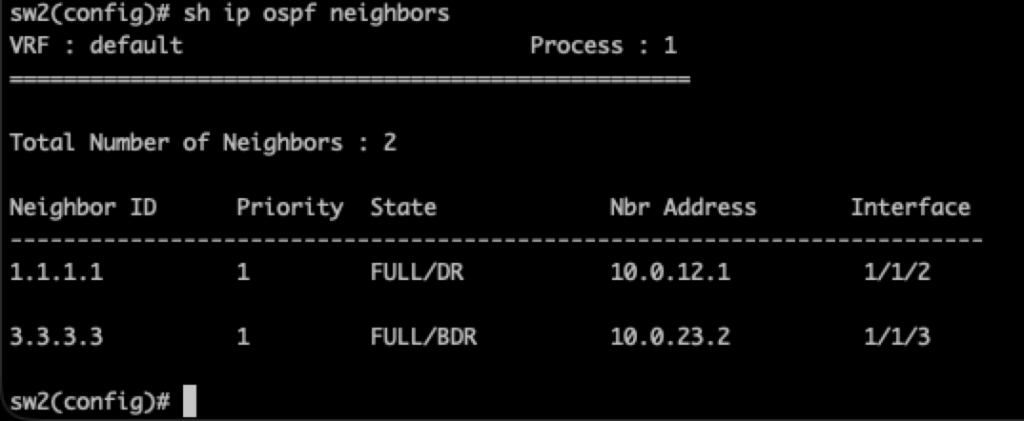
Another good command is sh ip ospf neighbors
Here you will see DR and BDR
DR = Designated Router
Acts as the hub for LSAs on that network
Chosen by highest priority (default is 1, 0-255)
BDR = Backup Designated Router
Takes over if the DR goes down
Common Commands for OSPF
router ospf <process id>
router-id <0.0.0.0>
ip ospf <process id> area <area number - Usually 0>